Prioritisation Matrix
Twelve ideas scored into one sprint. Figma, Arabic and English, light and dark.
What is a prioritisation matrix?
A prioritisation matrix turns a list of ideas into a ranked plan. Each idea is placed by impact against effort, into four quadrants: quick wins, big bets, fill ins, and time sinks. A printed formula, impact times six minus effort, scores every idea, so the team can agree what goes into the next sprint.
- downloads13
- Files3
- LanguagesEN and AR
- FormatsFigma and PDF
- Updated
What is inside
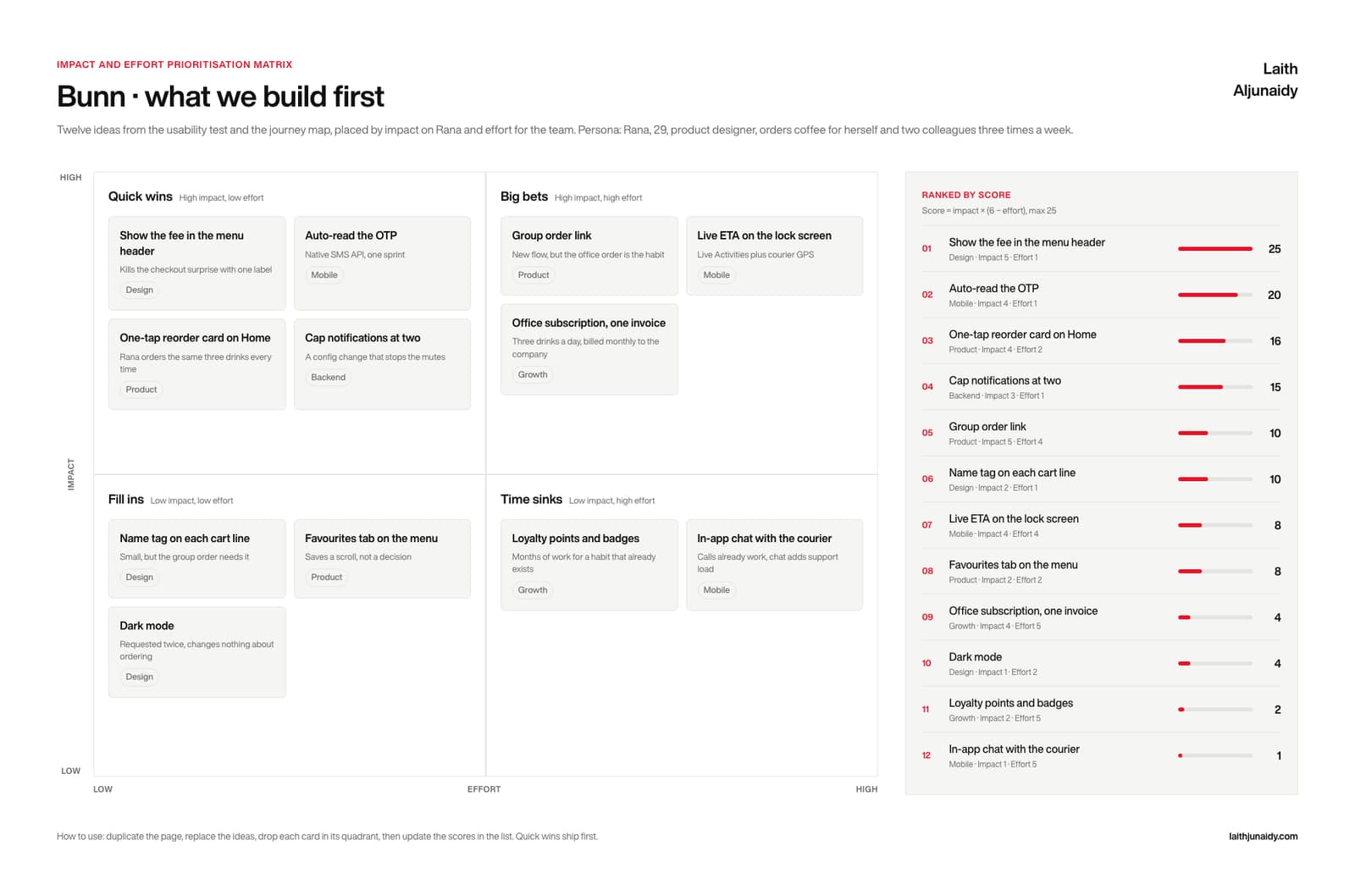
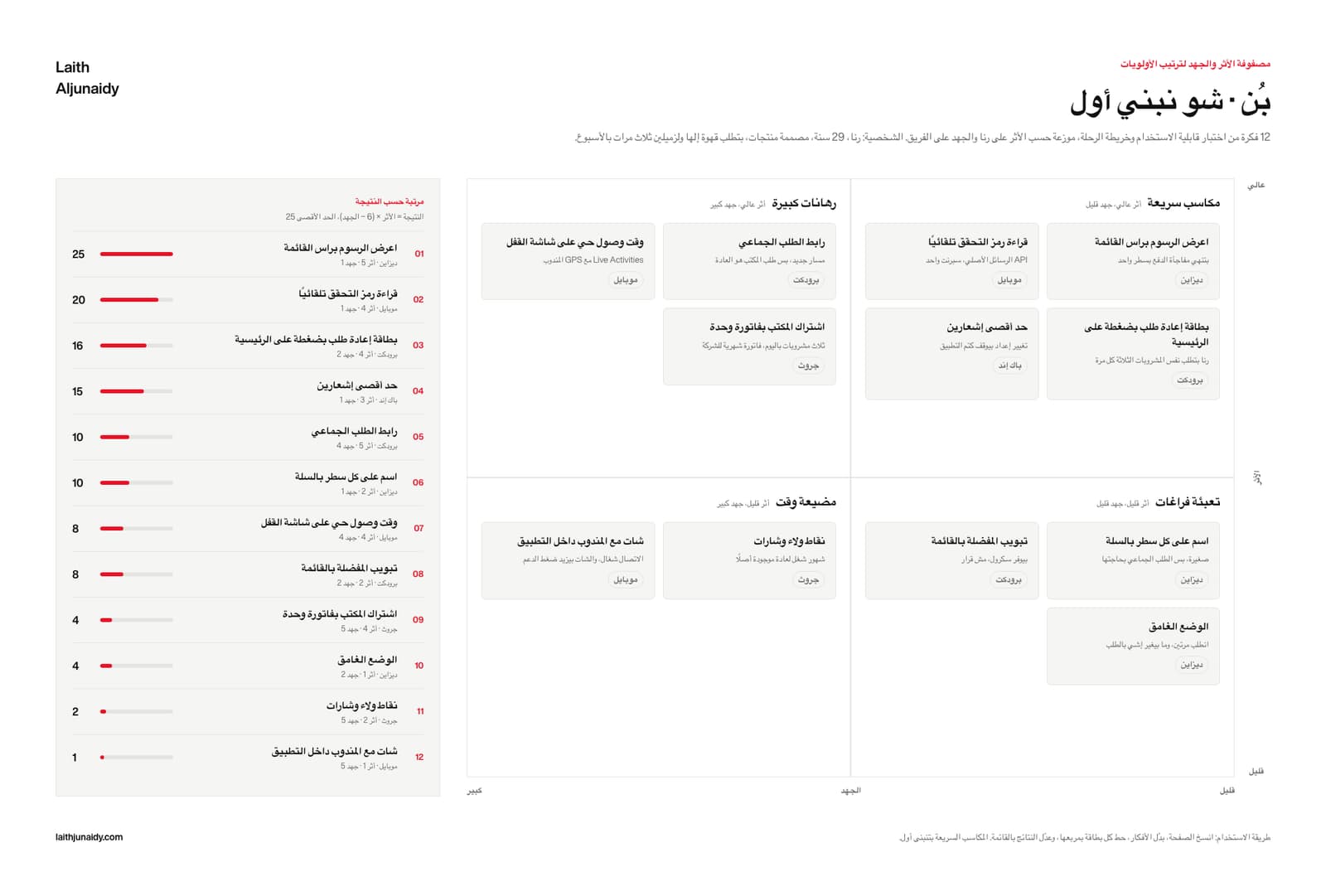
The Prioritisation Matrix is a free Figma template by Laith Aljunaidy for turning a list of ideas into a sprint. Impact against effort, four named quadrants, twelve idea cards with an owner tag, and a ranked side panel that scores every idea with the formula printed at the top. One Figma file with four pages, English and Arabic, light and dark, on one variable collection, plus a 9 page PDF guide. Free on Gumroad. The Pro edition, 10 dollars, adds five Claude prompts, a facilitation guide, a second worked example, and a Claude Code skill.
Twelve good ideas and one sprint. The loudest idea wins the room, and the one that would have fixed the drop off waits another quarter.
What is on the Prioritisation Matrix board?
The Prioritisation Matrix board is one Figma canvas with four parts, built in 2026 with auto layout so every cell grows as you type:
- The two axes. Impact runs up the side, effort runs across the bottom, both labelled low to high. Nothing on the board is unplaced.
- Four named quadrants. Quick wins for high impact and low effort, big bets for high impact and high effort, fill ins for low impact and low effort, time sinks for low impact and high effort. The names do the arguing for you.
- Twelve idea cards. Each card carries the idea, one line on why it sits where it sits, and an owner tag: design, mobile, product, backend or growth. Drag a card and it is reprioritised.
- The ranked list. A side panel ranking every idea by score, with the formula printed at the top: score is impact multiplied by six minus effort, capped at 25. Each row shows the owner, the impact and effort numbers, a score bar bound to the accent variable, and the score itself.
What changes when you use the Prioritisation Matrix?
The Prioritisation Matrix template is a fix for six common habits in how teams run this step. Each of the 6 pairs below shows the habit first, then what the template puts in its place. For example, the template turns twelve ideas in a backlog with no shape into four quadrants and a place for every one.
- Before: Twelve ideas in a backlog with no shape.
After: Four quadrants and a place for every one. - Before: Priority argued by seniority.
After: A score, with the formula printed on the board. - Before: “High impact” asserted and never checked.
After: Impact and effort scored one to five per idea. - Before: Nobody owns the idea.
After: An owner tag on every card. - Before: A ranking that changes with the room.
After: A ranked list that recomputes from the numbers. - Before: An English matrix with Arabic glued on.
After: Axes, cards and bars built right to left.
What is in the Prioritisation Matrix download?
The free Prioritisation Matrix download is one Figma file with four pages, English light, English dark, Arabic light and Arabic dark, on one variable collection, plus a 9 page PDF guide, made in 2026 with Figma variables. The Pro edition costs $10 and adds five Claude prompts, a facilitation guide, a second worked example and a Claude Code skill.
- FIG The template. One Figma file, four pages: English light, English dark, Arabic light, Arabic dark, all on one variable collection. Auto layout throughout, so every cell grows as you type.
- PDF The guide. 9 pages: the four boards, a five step how to use, and a glossary of every field with its Arabic label beside it.
- PDF, MD Pro. Five Claude prompts: fill it from my notes, critique it, Arabic edition, turn it into insights, push it to Figma.
- PDF Pro. The facilitation guide. A thirty minute session: what to ask, in what order, and how to close it.
- FIG Pro. A second worked example in a second market, as its own Figma file, so you can read the method instead of guessing at it.
- FOLDER Pro. The Claude Code skill. Point it at your notes folder and it fills the board, then writes it into your own Figma file by layer name.
Who is the Prioritisation Matrix for, and when should you run it?
The Prioritisation Matrix is for the end of a research round, when the findings have become a list and the list has to become a sprint. Run it with the people who will do the work, score every idea before you drag it, and ship the quick wins first.
In practice, keep the Prioritisation Matrix beside the design file, where the team can reread it before each decision. Two editions. Free: the Figma file and the 9 page PDF guide. Pro, $10: adds the five Claude prompts, the facilitation guide, the second worked example and the Claude Code skill.
Paid
Go further with the paid kits
The nine templates at their Pro edition in one kit, or your design system as a folder Claude reads.