Usability Test
Plan, script, and findings for five sessions. Figma, Arabic and English, light and dark.
What is a usability test?
A usability test puts real users in front of a product and asks them to complete set tasks. The team agrees a plan before recruiting, reads the same task scenarios aloud in every session, marks each task pass, partial, or fail, and records the findings by severity, with the evidence quote and the fix.
- downloads15
- Files3
- LanguagesEN and AR
- FormatsFigma and PDF
- Updated
What is inside
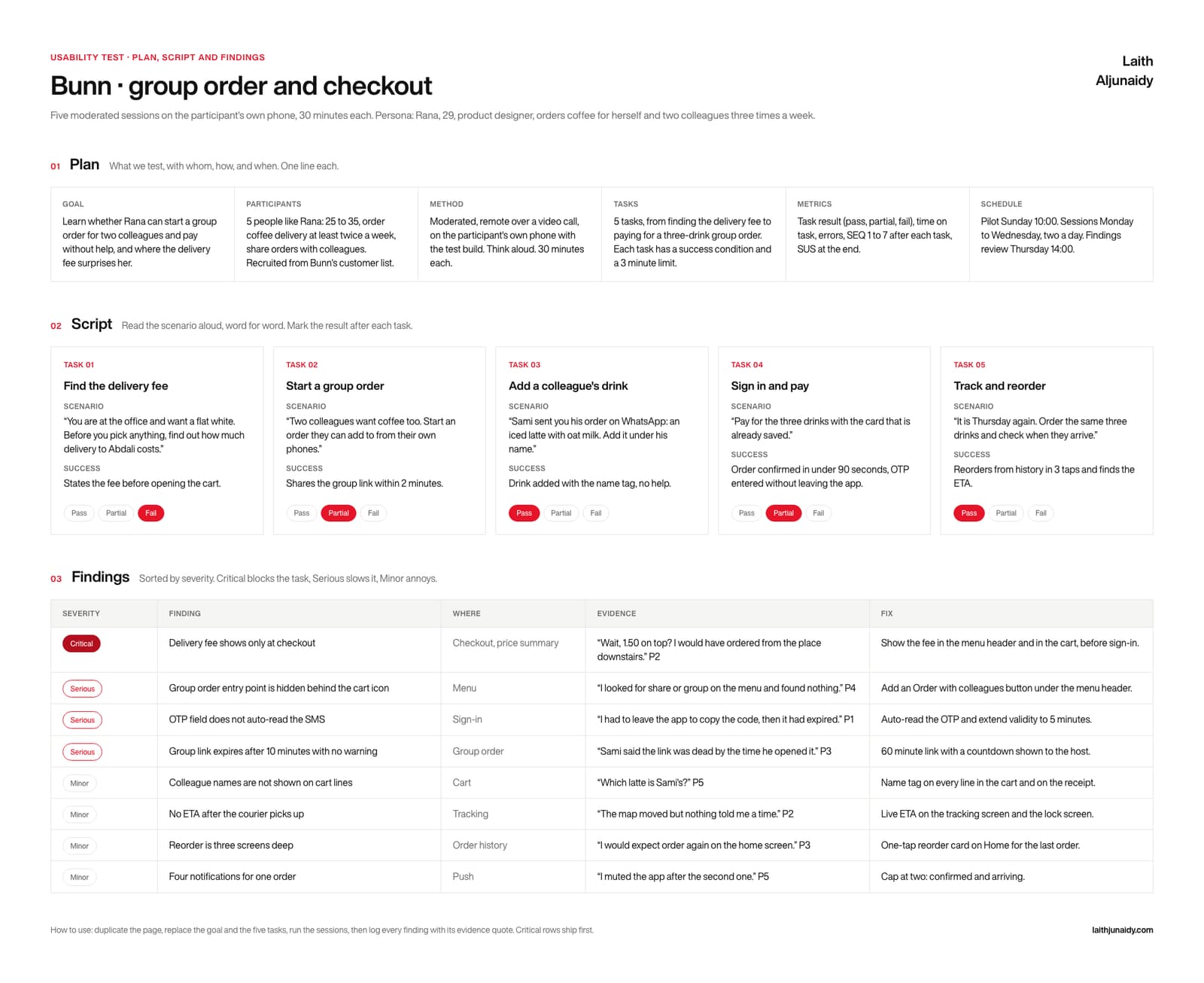
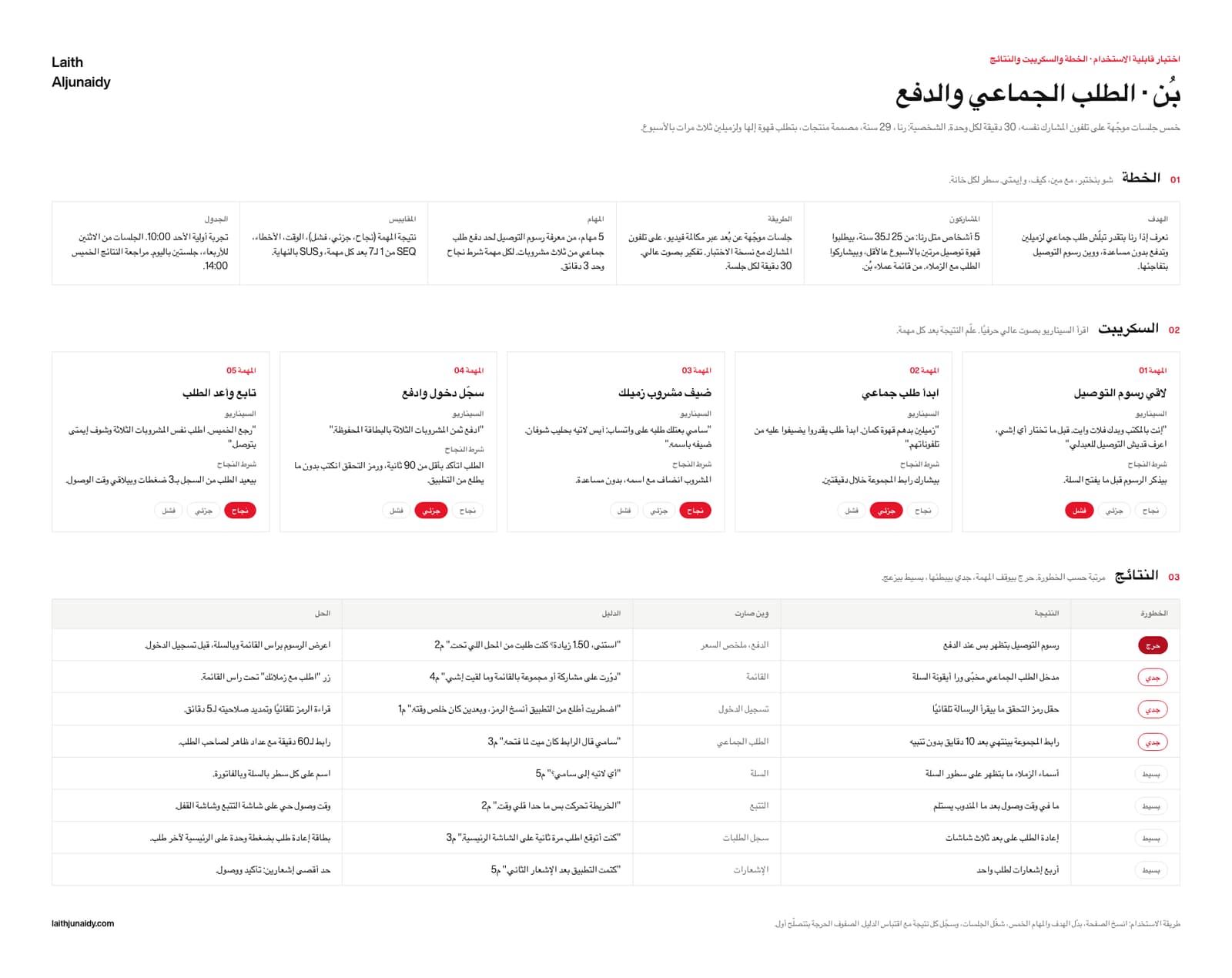
The Usability Test is a free Figma template by Laith Aljunaidy for planning, running, and recording a test with real users. A six cell plan, five task cards with scenarios read aloud word for word and Pass, Partial, Fail pills, and a findings table sorted by severity with the evidence quote and the fix. One Figma file with four pages, English and Arabic, light and dark, on one variable collection, plus a 9 page PDF guide. Free on Gumroad. The Pro edition, 10 dollars, adds five Claude prompts, a facilitation guide, a second worked example, and a Claude Code skill.
You watch five people struggle, and a week later the only record is a feeling that checkout was confusing. Nothing ships from a feeling.
What is on the Usability Test board?
The Usability Test board is one Figma canvas with four parts, built in 2026 with auto layout so every cell grows as you type:
- 01 Plan. Six cells, one line each: goal, participants and how they were recruited, method, tasks, metrics, and the schedule including the pilot. Agree this before you book anyone.
- 02 Script. Five task cards. Each carries a task number, a title, a scenario written to be read aloud word for word, and the success condition that decides the result. Under each card, a Pass, Partial, Fail pill row you mark while the session is still running.
- 03 Findings. A table sorted by severity: a Critical, Serious or Minor pill, then the finding, where it happened, the evidence quote with its participant number, and the fix. Critical rows ship first.
- The header. The goal in one sentence, the session count and length, and the persona line, so anyone who opens the board knows what was tested and on whom.
What changes when you use the Usability Test?
The Usability Test template is a fix for six common habits in how teams run this step. Each of the 6 pairs below shows the habit first, then what the template puts in its place. For example, the template turns a note that says “Checkout was confusing” into a finding, a place, a quote and a fix.
- Before: “Checkout was confusing.”
After: A finding, a place, a quote and a fix. - Before: Sessions improvised per participant.
After: One scenario read word for word, five times. - Before: Results argued from memory afterwards.
After: Pass, Partial or Fail marked on the card. - Before: Findings in the order you remembered them.
After: Sorted by severity, critical at the top. - Before: A fix with no evidence behind it.
After: The evidence quote in the row beside it. - Before: An Arabic session run off an English script.
After: A Levantine script on a right to left board.
What is in the Usability Test download?
The free Usability Test download is one Figma file with four pages, English light, English dark, Arabic light and Arabic dark, on one variable collection, plus a 9 page PDF guide, made in 2026 with Figma variables. The Pro edition costs $10 and adds five Claude prompts, a facilitation guide, a second worked example and a Claude Code skill.
- FIG The template. One Figma file, four pages: English light, English dark, Arabic light, Arabic dark, all on one variable collection. Auto layout throughout, so every cell grows as you type.
- PDF The guide. 9 pages: the four boards, a five step how to use, and a glossary of every field with its Arabic label beside it.
- PDF, MD Pro. Five Claude prompts: fill it from my notes, critique it, Arabic edition, turn it into insights, push it to Figma.
- PDF Pro. The facilitation guide. A thirty minute session: what to ask, in what order, and how to close it.
- FIG Pro. A second worked example in a second market, as its own Figma file, so you can read the method instead of guessing at it.
- FOLDER Pro. The Claude Code skill. Point it at your notes folder and it fills the board, then writes it into your own Figma file by layer name.
Who is the Usability Test for, and when should you run it?
The Usability Test is for the week you put a build in front of real users. Fill the plan first, run the pilot, read the scenarios word for word so five sessions stay comparable, then log every finding with its quote before the next one starts.
In practice, keep the Usability Test beside the design file, where the team can reread it before each decision. Two editions. Free: the Figma file and the 9 page PDF guide. Pro, $10: adds the five Claude prompts, the facilitation guide, the second worked example and the Claude Code skill.
Paid
Go further with the paid kits
The nine templates at their Pro edition in one kit, or your design system as a folder Claude reads.