User Persona
Eight blocks a team can build from, not a stock photo. Figma, Arabic and English, light and dark.
What is a user persona?
A user persona is one agreed user a product team designs for, built from real interviews. It records her bio, goals, frustrations, behaviours, the tools she already uses, her motivations scored out of five, a day with the product, and what all of it means for the interface. One persona per job to be done.
- downloads12
- Files3
- LanguagesEN and AR
- FormatsFigma and PDF
- Updated
What is inside
The User Persona is a free Figma template by Laith Aljunaidy that replaces the stock photo persona with eight blocks a team can build from: bio, goals, frustrations, behaviours, tools and apps, motivations scored out of five, a day with the product, and design implications. One Figma file with four pages, English and Arabic, light and dark, on one variable collection, plus an 8 page PDF guide. Free on Gumroad. The Pro edition, 10 dollars, adds five Claude prompts, a facilitation guide, a second worked example, and a Claude Code skill.
Most personas are a stock photo, an age range and a favourite coffee. Nobody opens them twice, because there is nothing in them a team can build from.
What is on the User Persona board?
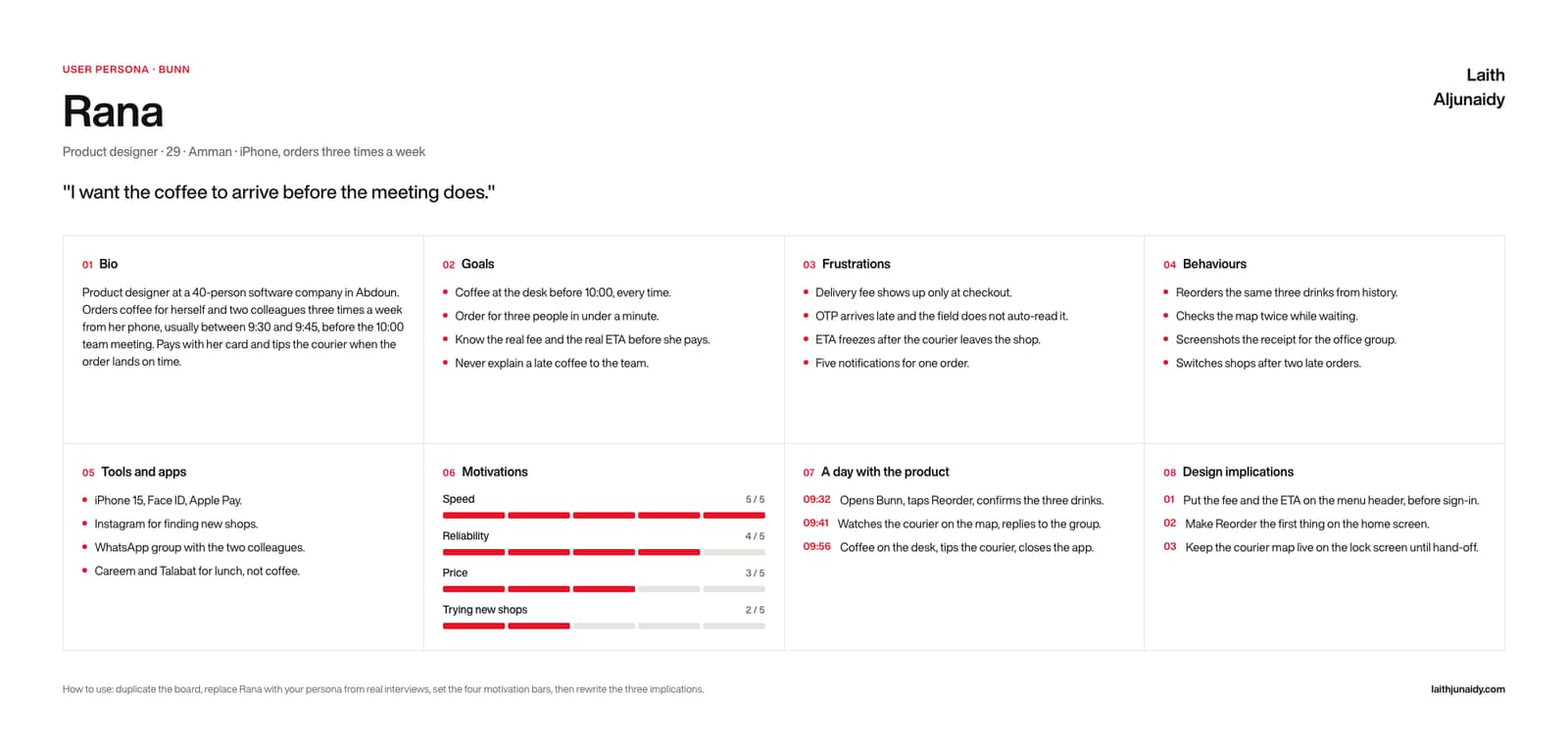
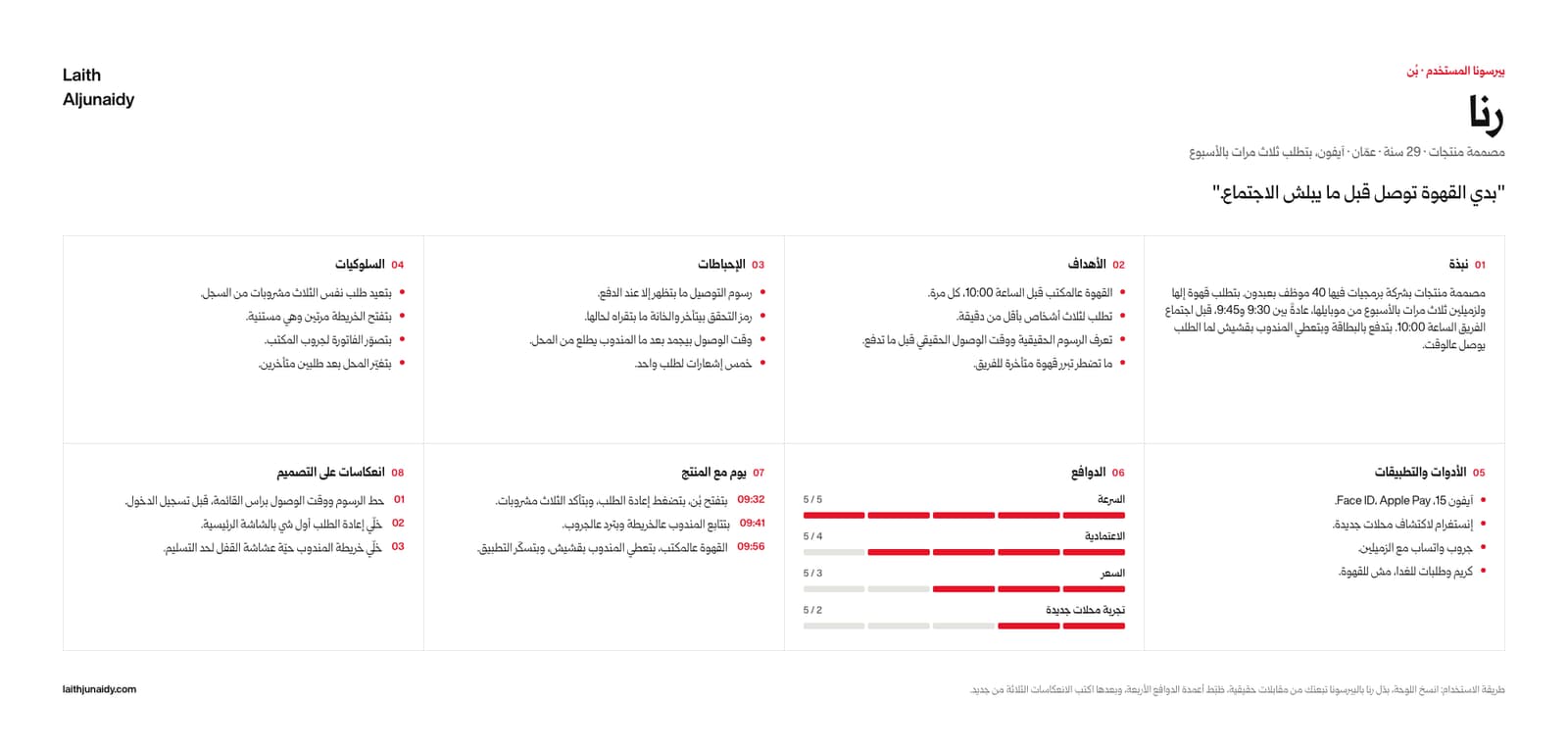
The User Persona board is one Figma canvas with a header and eight numbered blocks, built in 2026 with auto layout so every cell grows as you type:
- The header. Name, then a single line of role, age, city, device and frequency. Under it, a pull quote in her own words, taken from an interview.
- 01 Bio. A short paragraph of how she works: where, with whom, at what time, and how she pays. Times and places, not adjectives.
- 02 Goals, 03 Frustrations, 04 Behaviours. Three bulleted blocks, four lines each. Goals are what she is trying to get done, frustrations are what stops her, behaviours are what she already does without being asked.
- 05 Tools and apps. What is actually on her phone and which of it she uses for this job, including the apps she uses for something else.
- 06 Motivations. Four labelled bars scored out of five. The fill is bound to the accent variable, so the bars restyle with the board.
- 07 A day with the product. Three timestamped lines through one real session, start to finish.
- 08 Design implications. Three numbered lines. What this persona means for the interface, so the board does not end at the poster.
What changes when you use the User Persona?
The User Persona template is a fix for six common habits in how teams run this step. Each of the 6 pairs below shows the habit first, then what the template puts in its place. For example, the template turns a stock photo and a favourite coffee into eight blocks a team can build from.
- Before: A stock photo and a favourite coffee.
After: Eight blocks a team can build from. - Before: “Tech savvy, 25 to 34.”
After: A bio with a time, a place and a payment method. - Before: Adjectives about the user.
After: Observed behaviours, in the order she does them. - Before: Motivations described in a paragraph.
After: Four bars, scored out of five. - Before: A persona that ends at the poster.
After: Three design implications at the bottom of it. - Before: An Arabic persona translated from the English.
After: A Levantine bio, and bars that fill right to left.
What is in the User Persona download?
The free User Persona download is one Figma file with four pages, English light, English dark, Arabic light and Arabic dark, on one variable collection, plus a 8 page PDF guide, made in 2026 with Figma variables. The Pro edition costs $10 and adds five Claude prompts, a facilitation guide, a second worked example and a Claude Code skill.
- FIG The template. One Figma file, four pages: English light, English dark, Arabic light, Arabic dark, all on one variable collection. Auto layout throughout, so every cell grows as you type.
- PDF The guide. 8 pages: the four boards, a five step how to use, and a glossary of every field with its Arabic label beside it.
- PDF, MD Pro. Five Claude prompts: fill it from my notes, critique it, Arabic edition, turn it into insights, push it to Figma.
- PDF Pro. The facilitation guide. A thirty minute session: what to ask, in what order, and how to close it.
- FIG Pro. A second worked example in a second market, as its own Figma file, so you can read the method instead of guessing at it.
- FOLDER Pro. The Claude Code skill. Point it at your notes folder and it fills the board, then writes it into your own Figma file by layer name.
Who is the User Persona for, and when should you run it?
The User Persona is for product teams who need one agreed user before the first screen. Build it from real interviews, one persona per job to be done, and pin the design implications where the team argues.
In practice, keep the User Persona beside the design file, where the team can reread it before each decision. Two editions. Free: the Figma file and the 8 page PDF guide. Pro, $10: adds the five Claude prompts, the facilitation guide, the second worked example and the Claude Code skill.
Paid
Go further with the paid kits
The nine templates at their Pro edition in one kit, or your design system as a folder Claude reads.